Follow Your Favorite action figures Lines
Legendsverse allows you to follow specific action figures lines to customize your collection experience. When you follow lines like Marvel Legends, G.I. Joe Classified, or Star Wars Black Series, your checklists, notifications, and recommendations become tailored to what you actually collect!
Note: You need to be logged in to your Legendsverse account to follow lines. If you don't have an account yet, create one here to get started.
How to Follow Lines from Individual Line Pages
The easiest way to follow a action figures line is directly from its individual checklist page:
- Browse all available lines at
/checklist/linesto see what's available - Click on any line to go to its individual page (e.g.,
/checklist/marvel-legends) - Look for the "Follow Line" button in the top-right corner of the page header
- Click "Follow Line" to start following that line
- The button will change to show "Unfollow Line" to indicate you're now following it
- You'll see a confirmation message when the action is successful
- Click "Unfollow Line" if you want to stop following a line
Once you're following a line, you'll receive notifications about new releases, updates, and other important information related to that specific action figures line.
How to Manage Your Followed Lines (Settings Method)
You can also manage multiple lines at once through the settings interface:
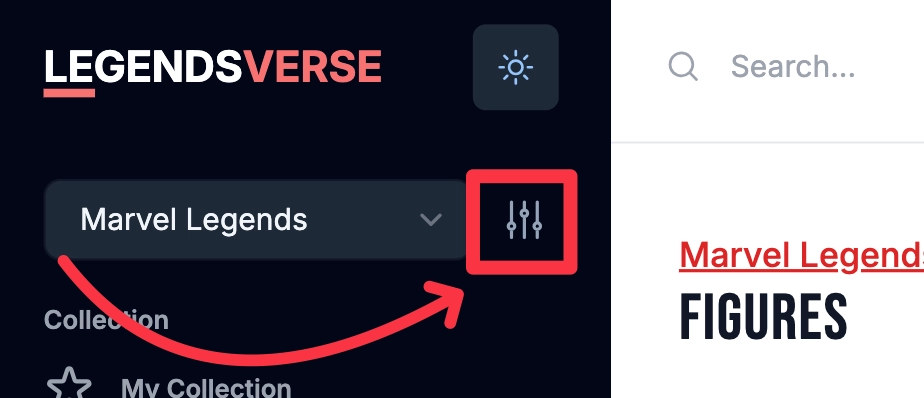
1.Look for the line dropdown in the sidebar 2. Click the settings icon next to the line dropdown 3. Select the action figures lines you want to follow from the modal that opens
- You can check/uncheck multiple lines at once
- Popular lines include Marvel Legends, G.I. Joe Classified, Star Wars Black Series, DC Multiverse, and many others
- Save your preferences by clicking the confirmation button
This bulk selection method is especially useful when you collect figures from multiple action figures lines and want to set up all your preferences at once.
Benefits of Following Lines
When you follow specific action figures lines, Legendsverse will:
- Show you targeted notifications when new figures are announced or released for your followed lines
- Customize your home screen to prioritize content from your followed lines
- Provide better recommendations based on your collecting preferences
- Filter your wishlist alerts to focus on the lines you actually collect
- Tailor your collection insights to be more relevant to your interests
- Personalize your checklist experience by highlighting content that matters to you
Managing Your Followed Lines
You can change which lines you follow at any time by:
- Visiting individual line checklist pages and using the Follow/Unfollow button
- Using the settings menu in the checklist sidebar to bulk-select your favorite lines
- Adjusting your preferences as your collecting interests change over time
There's no limit to how many lines you can follow, so feel free to follow all the action figures lines that interest you!
Getting Started
Ready to personalize your Legendsverse experience? Start by:
- Browsing all available lines to see what's available
- Clicking on 2-3 lines that match your collecting interests to visit their individual pages
- Using the "Follow Line" button on each line's page to follow them
- Exploring your personalized home feed to see the difference
- Adjusting your followed lines as needed over time using either method
Start following your favorite lines today to get a more personalized Legendsverse experience!